

Characters that stay right
Looks follow the story — disguises, outfits, injuries — at the exact scene.
For story recap creators
Ravember
Ravember reads your novel chapters and turns them into finished recap videos: scenes, picture prompts where every character looks right, narration with subtitles, camera motion, transitions and a YouTube cover. All in one Windows app.
7 chapters free · Sign in with Google · Windows 10 and 11 · No card needed
Early access · Windows 10 and 11 · 7 chapters free when it opens
Watch it work
Made for a real channel
Ravember is the toolkit behind Mr. Fool Explains — Hindi recaps of Lord of the Mysteries, Shadow Slave and more, made week after week.
Free to start
The right look. In every scene.
Characters change as the story goes: new outfits, disguises, injuries, transformations. Every picture has to show exactly where the character is in the story.
Ravember keeps every character looking right, scene after scene — automatically.
Chapter 364 · scene 1
Lumian Lee
RavemberHimself
Messy, short jet-black hair and bright blue eyes; a white open-collared shirt, a dark waistcoat and a worn brown leather jacket.
By handSame look
How it works
Five steps, one app. Each step hands its work to the next — and you can leave it running.
01 / Add the novel
Drop in the novel file or paste chapters. Ravember splits it into chapters and keeps your place in a series of hundreds.
02 / Scenes and characters
Gemini writes each chapter's scenes on your own free key. Ravember tracks every character — outfits, disguises, injuries — and gives each picture prompt the look that's true at that exact scene.
03 / Pictures
Ravember writes picture prompts for your favourite image maker, then checks what comes back: missing pictures, wrong order, a face that doesn't fit — all flagged before you build the video.
04 / Voice and subtitles
Use the free starter voices built in (no API key needed), or your own voice app. Ravember sets YouTube's loudness, writes the subtitles and marks every click or noise burst for you.
05 / Map, check and export
Every line is matched to its picture and every cut is checked. Then pick the motion, transitions, subtitles and cover, and export a finished MP4 — or send a ready timeline to DaVinci Resolve if you like to edit.
Finish inside Ravember
No second editor needed. Every piece runs on your PC: fast on a graphics card, and it still works without one.
Looks follow the story — disguises, outfits, injuries — at the exact scene.
No API key needed. Start narrating right away, or plug in your own voice app.
Every picture moves — by turns, or a random mix that never repeats.
Cross-fades, slides, wipes, circles and splits between pictures, made on your graphics card.
Burned into the video with proper Hindi (Devanagari) shaping, or saved as .srt. Placed safely for Shorts.
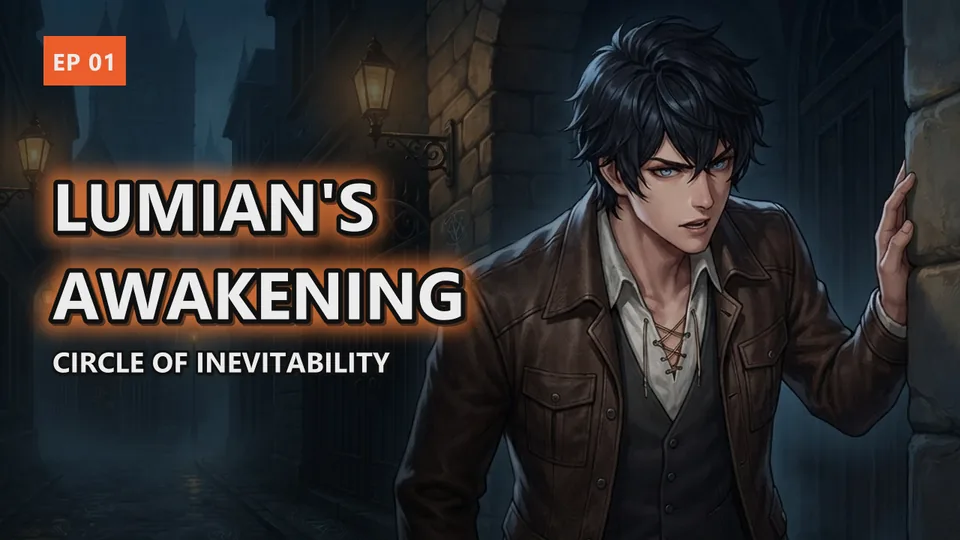
1280×720 covers with a big title, glow, episode badge and your logo. One design, every episode its own.
Missing pictures, a voice cut short, subtitles out of step: Ravember tells you before you wait for a render.
New pieces arrive often — see every update in plain words.
Why Ravember
Leave it running: Ravember writes the next chapters' scenes, makes the voices and exports your queued videos — then it can put the PC to sleep.
Scene writing runs on your own free Google Gemini key, so there are no writing credits to buy.
A wrong chapter, a mismatched cut, a disguise left on: Ravember says so in plain words, what was kept safe, and what to do next.
Pricing
₹0
Coming soon
Pricing soon
You use your own free Google Gemini key. One email when Pro opens, nothing else. Privacy
Start free
Sign in with Google, download Ravember, and make your first recap. When you want more, Ravember Pro has no limits — and come say hi in the Discord.
No card needed · 7 chapters + 7 mappings free · Privacy
Early access
Join the waitlist for the first invites — your first 7 chapters are free when it opens, and come say hi in the Discord.
We only email you about Ravember. No spam, never sold. Privacy
Questions
A Windows app that turns novel chapters into finished recap videos: the scenes and picture prompts, characters that stay the same, narration with subtitles, camera motion, transitions, a YouTube cover, and a check of every cut. It exports the MP4 itself, or a timeline for DaVinci Resolve.
No. Ravember starts from the novel's text — that's the point. Most web novels never got a manhwa, and your recap can still be fully illustrated.
Ravember writes the picture prompts — with each character's right look for that scene — and checks the pictures you bring back. You make the pictures with your own image maker, such as Gemini.
No. Free starter voices are built in, with no API key needed. For your own trained voice, Ravember works with your voice app (such as Pinokio presets or ElevenLabs).
No. Ravember exports a finished MP4 with motion, transitions, subtitles and a cover. If you like editing by hand, it can also hand you a ready Resolve timeline.
Creators who make story recap videos — Lord of the Mysteries, Shadow Slave, web novels and more. It is made for long stories with many chapters and many characters.
No. Any Windows 10 or 11 PC works. A graphics card (like an RTX 3060) makes exports several times faster.
The novel can be in English, and your narration can be in Hindi or English — Mr. Fool Explains is narrated in Hindi.
Every account gets 7 chapters and 7 chapter mappings free, for life, with no card needed. After that, Ravember Pro will remove the limits — its plans are coming soon (leave your email under Pricing to hear first). You use your own free Gemini key.
Any time, on your account page. Pro stays on until the end of the time you paid for. See the refund and cancellation policy.
Free video lessons walk you through it, from installing to your first finished video: Learn Ravember. Every update is listed on the changelog.
Your Google name, email and photo, your plan, and how many chapters you've used. Your chapters stay on your PC. It is never sold or shared. See the privacy notice.